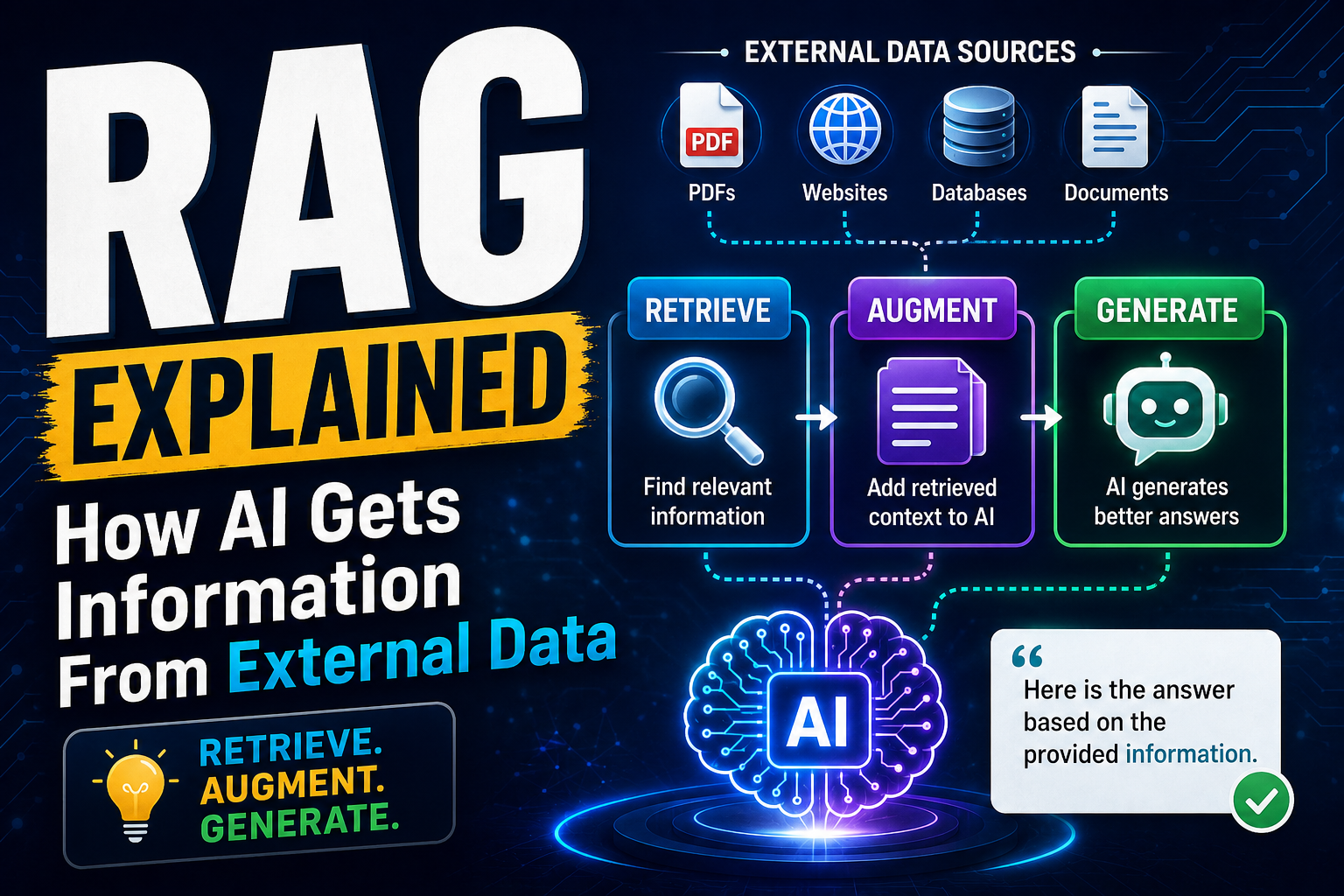
Retrieval-Augmented Generation (RAG) has become one of the most important techniques in modern AI development. Large language models (LLMs) such as ChatGPT, Claude, and Gemini can generate remarkably useful answers, but they have an important limitation: they do not automatically know everything about your private, current, or specialised data.
This is where Retrieval-Augmented Generation (RAG) comes in.
Instead of relying entirely on what an AI model learned during training, RAG allows an AI application to retrieve relevant information from external sources and use that information to generate a better answer.
This approach is increasingly used for enterprise knowledge bases, customer-support systems, document assistants, coding tools, research applications, and internal company chatbots.
In this guide, we’ll explore what RAG is, how it works, its architecture, why it matters, its advantages and limitations, and how developers can build RAG-powered applications.
What Is RAG?
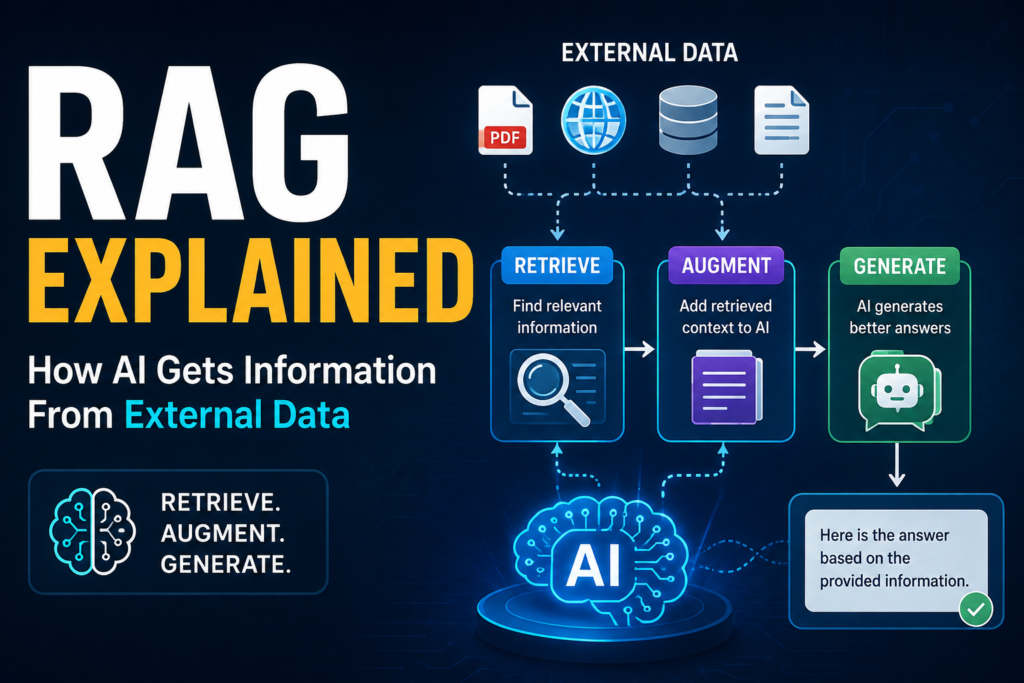
RAG stands for Retrieval-Augmented Generation.
It combines two major capabilities:
- Retrieval — finding relevant information from an external knowledge source.
- Generation — using an AI language model to generate an answer based on that information.
In a traditional LLM application, the model might answer a question using only the knowledge encoded in its parameters.
With RAG, the process becomes:
User Question → Retrieve Relevant Information → Give Information to LLM → Generate Answer
For example, imagine a company has thousands of internal documents containing:
- Employee policies
- Product documentation
- Technical manuals
- Customer FAQs
- Internal procedures
- Financial reports
An LLM may not have access to these documents.
A RAG system can search the company’s knowledge base, retrieve the relevant sections, and provide them to the LLM as context.
The model can then generate an answer based on that retrieved information.
A Simple Example
Suppose an employee asks:
“How many days of parental leave does our company provide?”
A normal LLM may not know the company’s specific policy.
A RAG system can:
- Search the company’s HR documents.
- Find the parental-leave policy.
- Extract the relevant section.
- Send that information to the LLM.
- Generate an answer.
So instead of asking the model to remember the answer, we allow it to look up the answer.
Why Do We Need RAG?
Large language models are powerful, but they have several limitations.
1. Knowledge Cutoff
Models are trained on large datasets, but their knowledge does not automatically update every time something changes.
For example, information about:
- Company policies
- Product documentation
- New regulations
- Internal databases
- Recent research
- Frequently changing business information
may not exist in the model’s training data.
RAG allows applications to connect models to updated external information.
2. Private Data
Organizations often have information that should never be part of a public model’s training data.
Examples include:
- Internal documentation
- Customer records
- Business reports
- Engineering documentation
- Legal documents
- HR policies
RAG can allow an application to retrieve authorized information from these sources when answering questions.
3. Hallucinations
LLMs can sometimes generate information that sounds convincing but is incorrect.
This phenomenon is commonly called an AI hallucination.
RAG can reduce this problem by giving the model relevant source material to use while generating its response.
However, an important point is:
RAG does not completely eliminate hallucinations.
If the retrieval system finds incorrect, outdated, or irrelevant information, the model can still produce a bad answer.
How Does RAG Work?
A typical RAG system can be divided into two major phases:
Phase 1: Indexing
External data is collected, processed, divided into smaller pieces, converted into embeddings, and stored in a searchable system.
Phase 2: Retrieval and Generation
When a user asks a question, the system searches for relevant information, retrieves it, and gives it to the LLM to generate the final response.
The complete pipeline looks like this:
Documents → Chunking → Embeddings → Vector Database
Then:
User Question → Query Embedding → Similarity Search → Relevant Chunks → LLM → Answer
Let’s understand each stage.
Step 1: Collect External Data
The first step is gathering the information that the AI application should be able to access.
Data can come from many sources:
- PDFs
- Word documents
- Websites
- Databases
- CSV files
- Product manuals
- Company documentation
- APIs
- Cloud storage
- Knowledge bases
- Internal wikis
For example, suppose you’re building a chatbot for a university.
You might collect:
- Course information
- Admission rules
- Fee structures
- Examination policies
- Hostel rules
- Academic calendars
This becomes the knowledge source for your RAG system.
Step 2: Document Processing
Raw documents are rarely ready to be directly searched.
A PDF, for example, may contain:
- Headings
- Paragraphs
- Tables
- Images
- Footnotes
- Multiple pages
The system first extracts and cleans the useful text.
This stage may involve:
- Removing unnecessary formatting
- Extracting text
- Cleaning duplicate content
- Preserving metadata
- Converting different file formats into a common representation
The quality of this step directly affects the quality of the final AI system.
Step 3: Chunking
Large documents are usually divided into smaller sections called chunks.
For example, imagine a 100-page employee handbook.
Instead of embedding the entire document as one huge piece, we might divide it into smaller sections.
For example:
Chunk 1:
Company introduction...

Chunk 2:
Working hours and attendance...

Chunk 3:
Leave policy...

Chunk 4:
Remote work policy...

Chunk 5:
Parental leave policy...
When someone asks about parental leave, the system can retrieve the relevant chunk instead of processing the entire handbook.
Why Is Chunking Important?
Poor chunking can negatively affect retrieval.
If chunks are:
- Too large → irrelevant information may be included.
- Too small → important context may be lost.
Good chunking attempts to preserve meaningful context while keeping retrieval efficient.
Step 4: Convert Text Into Embeddings
Now comes one of the most important concepts in RAG: embeddings.
An embedding is a numerical representation of text that captures aspects of its meaning.
For example:
"How can I reset my password?"
and
"I forgot my account password. How do I change it?"
use different words, but their meanings are similar.
An embedding model can represent both as vectors that are relatively close in vector space.
Conceptually:
"Reset password"
        ↓
[0.21, -0.43, 0.77, 0.18, ...]
The actual vectors contain many more dimensions, but the key idea is simple:
Embeddings transform information into a mathematical representation that can be compared for semantic similarity.
Step 5: Store Embeddings in a Vector Database
Once the chunks are converted into embeddings, they need to be stored somewhere where they can be efficiently searched.
This is where vector databases come into play.
Popular technologies include:
- Pinecone
- Weaviate
- Milvus
- Qdrant
- Chroma
- FAISS
A vector database stores information such as:
Document Chunk
      +
Embedding
      +
Metadata
Metadata might include:
document = employee_handbook.pdf
page = 42
department = HR
last_updated = 2026-06-15
This metadata can later help filter retrieval results.
Step 6: User Asks a Question
Now suppose the user asks:
“What is the company’s parental leave policy?”
The system converts the user’s question into an embedding using the same or compatible embedding approach.
Conceptually:
User Question
      ↓
Embedding Model
      ↓
Query Vector
Step 7: Semantic Search
The query vector is compared with vectors stored in the database.
The system looks for chunks that are semantically similar to the user’s question.
For example:
Query:
"What is the company's parental leave policy?"

Retrieved results:

1. Parental Leave Policy — Page 42
2. Family Benefits — Page 44
3. Employee Leave Rules — Page 38
The most relevant chunks are then selected.
This is often called Top-K retrieval, where K represents the number of results returned.
For example:
Top-K = 5
means the system retrieves the five most relevant chunks.
Step 8: Add Retrieved Information to the Prompt
The retrieved information is then provided to the language model as context.
Conceptually, the prompt might look like:
System:
Answer the user's question using the provided context.

Context:
[Retrieved company policy]

User:
What is the company's parental leave policy?
The LLM now has access to relevant information that wasn’t necessarily present in its original training data.
Step 9: Generate the Final Answer
The language model processes:
- The user’s question
- Retrieved context
- System instructions
- Conversation history, if applicable
It then generates the final response.
For example:
“According to the company’s parental leave policy, eligible employees receive X weeks of leave…”
A production RAG system may also provide citations pointing back to the original document.
This makes the answer easier to verify.
RAG Architecture
A simplified RAG architecture looks like this:
                 EXTERNAL DATA
                      │
       ┌──────────────┼──────────────┐
       ↓              ↓              ↓
      PDFs          Websites       Databases
       │              │              │
       └──────────────┼──────────────┘
                      ↓
              Document Processing
                      ↓
                   Chunking
                      ↓
               Embedding Model
                      ↓
                Vector Database
                      │
                      │
                      │
User Question ────────┘
       │
       ↓
Query Embedding
       │
       ↓
Similarity Search
       │
       ↓
Relevant Documents
       │
       ↓
      LLM
       │
       ↓
Final Answer
This architecture separates knowledge retrieval from language generation.
RAG vs Traditional LLM
Understanding the difference between a normal LLM application and a RAG application is important.
| Feature | Traditional LLM | RAG |
|---|---|---|
| External knowledge | Limited | Yes |
| Private documents | Not automatically | Yes |
| Updating knowledge | Usually requires new data/model process | Update knowledge source |
| Hallucination control | Limited | Can be improved |
| Source citations | Not guaranteed | Can be implemented |
| Domain-specific information | Limited | Stronger |
| Real-time information | Limited | Possible |
| Development complexity | Lower | Higher |
RAG does not replace an LLM.
Instead, RAG gives an LLM access to additional information.
RAG vs Fine-Tuning
RAG and fine-tuning are often confused because both can be used to customize AI applications.
However, they solve different problems.
RAG
RAG is primarily useful when you want the model to access external knowledge.
For example:
“Answer questions using our company’s latest documentation.”
Fine-Tuning
Fine-tuning is useful when you want to modify how a model behaves or performs a particular task.
For example:
“Generate customer-support responses in our company’s preferred style.”
Simple Comparison
| RAG | Fine-Tuning |
|---|---|
| Adds external knowledge | Changes model behavior |
| Knowledge can be updated independently | Updating knowledge may require additional training |
| Good for document Q&A | Good for specialized behavior |
| Can provide source references | Doesn’t inherently provide sources |
| Often easier to update | Training process can be more involved |
In many real-world systems, RAG and fine-tuning can also be used together.
What Is a Vector Database?
A vector database is a database designed to store and search numerical vector representations efficiently.
Traditional databases might perform searches such as:
SELECT * FROM documents
WHERE title LIKE '%password%';
This is primarily based on matching words or structured fields.
Vector search instead focuses on semantic similarity.
For example, a user asks:
“I cannot access my account.”
A semantic search system may retrieve:
“Steps to reset your password”
even though the exact phrase “reset password” wasn’t used in the question.
This is one of the major advantages of vector-based retrieval.
How Similarity Search Works
There are several ways to measure similarity between vectors.
One common technique is cosine similarity.
Conceptually:
Similarity(A, B)
        ↓
Compare the direction of vectors
        ↓
Higher similarity = more semantically related
You don’t need to understand the mathematical formula to build a basic RAG application, but understanding the concept is useful.
The system essentially asks:
“Which stored pieces of information are most similar in meaning to the user’s question?”
Hybrid Search: Beyond Vector Search
Modern RAG systems don’t always rely exclusively on vector search.
Another approach is keyword search.
For example, suppose the user searches for:
“CVE-2026-1234”
Exact keyword matching can be extremely important.
A purely semantic search system might not always prioritize the exact identifier as effectively as a keyword-based system.
This is why many advanced RAG systems use hybrid search.
Hybrid search combines:
Keyword Search + Semantic Search
This can improve retrieval for technical documentation, product names, IDs, error codes, and natural-language questions.
What Is Reranking?
Retrieving documents is only half the problem.
The system also needs to determine which retrieved documents are actually the most useful.
A reranker can take the initial search results and reorder them according to their relevance to the user’s question.
For example:
Initial retrieval:

Document A — score 0.82
Document B — score 0.79
Document C — score 0.76
Document D — score 0.74
After reranking:
Document C — most relevant
Document A
Document D
Document B
This additional step can improve answer quality because the LLM receives better context.
Advanced RAG Pipeline
A production-grade RAG system may look more like:
User Query
    ↓
Query Processing
    ↓
Query Expansion / Rewriting
    ↓
Hybrid Retrieval
    ↓
Vector Search + Keyword Search
    ↓
Top-K Results
    ↓
Reranking
    ↓
Context Filtering
    ↓
Prompt Construction
    ↓
LLM
    ↓
Answer + Citations
    ↓
Evaluation / Feedback
This is significantly more sophisticated than the basic:
Query → Vector Search → LLM
pipeline.
Query Rewriting
Sometimes the user’s question is too vague or poorly structured.
For example:
“What about the leave?”
A RAG system might use conversation history to understand that the user is asking about:
“What is the company’s parental leave policy?”
Query rewriting can improve retrieval by transforming an ambiguous question into a more searchable one.
Metadata Filtering
Metadata can make retrieval much more precise.
Suppose a company has documents from different departments.
A search could include filters such as:
department = Engineering
year = 2026
document_type = Technical
Then the system retrieves only relevant documents.
This is particularly useful in enterprise applications.
RAG With Citations
One of the most useful features of a professional RAG system is source attribution.
Instead of simply saying:
“The policy provides 12 weeks of leave.”
the application could say:
“The company provides 12 weeks of parental leave, according to the Employee Leave Policy, page 42.”
This provides users with a way to verify the answer.
For enterprise and research applications, citations can significantly improve trust.
Real-World Applications of RAG
RAG is useful across many industries.
1. Customer Support
A company can build an AI support assistant using:
- Product documentation
- FAQs
- Troubleshooting guides
- Warranty policies
Customers can ask questions in natural language and receive answers grounded in the company’s documentation.
2. Enterprise Knowledge Search
Employees often waste time searching through:
- PDFs
- Emails
- Documentation
- Internal wikis
- Reports
A RAG assistant can provide a conversational interface over this information.
3. Healthcare Research
RAG can help researchers search large collections of:
- Research papers
- Medical literature
- Clinical documentation
- Scientific reports
However, healthcare applications require strong validation, privacy protections, and appropriate human oversight.
4. Legal Research
Legal professionals work with large collections of documents.
RAG can help locate:
- Relevant clauses
- Previous documents
- Case information
- Regulations
- Contracts
Again, generated results should be verified by qualified professionals when used for consequential decisions.
5. Education
Students could interact with:
- Textbooks
- Lecture notes
- Course materials
- University policies
For example:
“Explain Chapter 5 using my uploaded notes.”
The system can retrieve relevant sections and generate an explanation.
6. Software Development
Developers can create RAG systems that understand:
- API documentation
- Internal code documentation
- Architecture documents
- Technical manuals
- Git repositories
A developer could ask:
“How do we authenticate requests to our payment API?”
The system retrieves the company’s API documentation and generates an answer.
RAG in Coding Assistants
RAG has an especially interesting application in software engineering.
Imagine a company has a large codebase.
A developer asks:
“Where is authentication handled in this application?”
Instead of sending the entire repository to an LLM, the system can retrieve:
- Relevant files
- Function definitions
- Documentation
- Configuration
- Related code
The LLM can then reason over the retrieved context.
This is much more scalable than providing an entire codebase in every prompt.
Benefits of RAG
1. Access to External Knowledge
RAG allows AI systems to work with information outside the model’s original training data.
2. Easier Knowledge Updates
Instead of retraining the entire model whenever a document changes, the underlying knowledge source can be updated.
3. Better Domain-Specific Answers
A general-purpose model can be connected to specialized information.
4. Source Attribution
Retrieved documents can be used to provide citations and references.
5. Private Knowledge
Organizations can build AI applications around internal knowledge repositories.
6. Reduced Hallucination Risk
Grounding responses in retrieved information can reduce unsupported answers, although it cannot guarantee correctness.
Limitations of RAG
RAG is powerful, but it is not magic.
1. Poor Retrieval Means Poor Answers
If the system retrieves the wrong information, the LLM may generate an incorrect answer.
This leads to a simple principle:
Better retrieval generally leads to better grounded generation.
2. Chunking Is Difficult
There is no universal chunk size that works for every dataset.
Technical documentation, legal documents, research papers, and conversations may require different strategies.
3. Context Window Limitations
Sending too many retrieved chunks to an LLM can:
- Increase cost
- Increase latency
- Add irrelevant information
- Make reasoning harder
More context does not automatically mean better answers.
4. Data Quality Problems
If the source documents are outdated or incorrect, the RAG system can retrieve outdated or incorrect information.
RAG cannot magically fix bad data.
5. Security Risks
Enterprise RAG systems can introduce security concerns.
For example, a user should not be able to retrieve confidential information simply because it exists in the knowledge base.
Proper authorization and access controls are essential.
RAG Security Considerations
A production RAG system should consider:
- Authentication
- Authorization
- Document-level permissions
- Tenant isolation
- Sensitive-data handling
- Prompt injection
- Malicious documents
- Data leakage
- Logging and auditing
For example, if an employee doesn’t have permission to access a financial document, the retrieval system should prevent that document from being returned.
Security should be enforced before information reaches the LLM, not merely through a prompt saying “don’t reveal confidential information.”
Common RAG Mistakes
Developers sometimes assume that adding a vector database automatically creates a good RAG system.
It doesn’t.
Common mistakes include:
Mistake 1: Poor Chunking
Breaking documents into arbitrary pieces can destroy important context.
Mistake 2: Retrieving Too Many Documents
More retrieved information can actually make the final answer worse.
Mistake 3: Ignoring Metadata
Metadata can dramatically improve retrieval precision.
Mistake 4: No Evaluation
A RAG application should be tested systematically rather than judged only by a few examples.
Mistake 5: No Source Attribution
For knowledge-heavy applications, citations make answers easier to verify.
Mistake 6: Ignoring Permissions
Private information should not automatically become available to every user simply because it is indexed.
How Developers Can Build a RAG Application
A typical RAG technology stack might include:
Programming Language
- Python
- JavaScript/TypeScript
- Java
LLM
- OpenAI models
- Anthropic models
- Google models
- Open-source LLMs
Embedding Model
Used to convert documents and queries into vectors.
Vector Database
Examples include:
- Pinecone
- Qdrant
- Weaviate
- Milvus
- Chroma
RAG Frameworks
Developers can also use frameworks such as:
- LangChain
- LlamaIndex
The exact technology stack depends on the application’s requirements.
A Simple Conceptual RAG Example
Suppose we have three documents:
Document A:
"Employees receive 20 vacation days per year."

Document B:
"Employees can work remotely three days per week."

Document C:
"Parental leave is available to eligible employees."
The user asks:
"How many vacation days do employees receive?"
The system performs:
User Query
     ↓
Create Query Embedding
     ↓
Search Vector Database
     ↓
Retrieve Document A
     ↓
Send Document A + Question to LLM
     ↓
Generate Answer
Final answer:
“Employees receive 20 vacation days per year.”
The important point is that the answer is grounded in the retrieved document.
RAG Is More Than a Vector Database
One common misconception is:
“RAG = LLM + Vector Database.”
That’s an oversimplification.
A strong RAG system can involve:
- Data ingestion
- Document parsing
- Chunking
- Embedding
- Metadata management
- Hybrid retrieval
- Query rewriting
- Reranking
- Context compression
- Prompt engineering
- Access control
- Citation generation
- Evaluation
- Monitoring
The vector database is only one component of the overall architecture.
The Future of RAG
RAG is evolving rapidly.
Future systems are likely to become more sophisticated through:
Agentic Retrieval
AI agents can decide:
“I need more information before answering this question.”
The system can then perform multiple retrieval steps.
Multimodal RAG
Instead of retrieving only text, systems can retrieve:
- Images
- Charts
- Tables
- Audio
- Video
- PDFs
This can allow AI systems to reason over richer information.
Graph RAG
Graph-based approaches can represent relationships between entities and concepts.
For example:
Employee
   ↓
Department
   ↓
Project
   ↓
Technology
   ↓
Documentation
This can be useful when relationships between pieces of information matter as much as semantic similarity.
More Accurate Retrieval
Future RAG systems will increasingly combine:
Keyword Search + Vector Search + Reranking + Knowledge Graphs + AI Agents
to produce more reliable answers.
RAG vs Long Context: Which Is Better?
Modern LLMs can process very large context windows, which raises an important question:
“Why use RAG if an LLM can read a huge document?”
Long context and RAG solve related but different problems.
If you have a small document, sending the entire document to the model may be practical.
But imagine a company has:
100,000 documents.
Sending everything to an LLM for every question would be expensive and inefficient.
RAG allows the system to retrieve only the information relevant to the current question.
Therefore:
Long Context = Give the model more information
RAG = Find the right information first
In many applications, they can work together.
How to Evaluate a RAG System
Building a RAG system is not enough. You need to measure whether it actually works.
Important evaluation areas include:
Retrieval Quality
Did the system retrieve the correct information?
Answer Relevance
Does the answer actually address the question?
Groundedness
Is the generated answer supported by the retrieved context?
Citation Accuracy
Do the citations actually support the claims?
Latency
How quickly does the system respond?
Cost
How much does each query cost?
A good RAG system should optimize for accuracy, relevance, latency, security, and cost, rather than focusing only on response quality.
Key Takeaways
Retrieval-Augmented Generation is an architecture that connects language models with external knowledge.
The basic process is:
External Data
     ↓
Process Documents
     ↓
Split Into Chunks
     ↓
Create Embeddings
     ↓
Store in Vector Database
     ↓
User Query
     ↓
Retrieve Relevant Information
     ↓
Provide Context to LLM
     ↓
Generate Grounded Answer
The biggest advantage of RAG is that it allows an AI system to work with information that exists outside the model itself.
It can make AI applications more useful for private, specialized, and frequently changing information.
However, RAG is not a guaranteed solution to hallucinations. Its effectiveness depends heavily on the quality of the data, chunking strategy, retrieval system, model, security architecture, and evaluation process.
Final Thoughts
The future of AI isn’t simply about building larger language models.
It is also about connecting intelligent models to the right information at the right time.
That’s why RAG has become such an important concept in modern AI engineering.
A language model provides the reasoning and generation capability.
A retrieval system provides the knowledge.
Together, they create AI applications that can interact with information far beyond what is contained inside the model’s original training data.
For developers, understanding RAG is increasingly valuable because many practical enterprise AI applications are moving from simple chatbots towards knowledge-grounded AI systems, AI agents, and intelligent information assistants.
In simple terms:
An LLM knows what it learned. RAG helps it find what it needs.
And that simple idea is becoming one of the foundations of modern AI applications.
Frequently Asked Questions
What does RAG stand for?
RAG stands for Retrieval-Augmented Generation. It is an AI architecture that retrieves relevant information from external sources and provides it to a language model before generating a response.
Is RAG the same as fine-tuning?
No. RAG primarily gives an AI model access to external knowledge, while fine-tuning changes the model’s behavior or capabilities for a particular task.
Does RAG eliminate AI hallucinations?
No. RAG can reduce unsupported responses by grounding the model in retrieved information, but incorrect retrieval, poor source data, or model errors can still result in hallucinations.
Does RAG require a vector database?
Not necessarily. RAG can use keyword search, vector search, hybrid search, databases, APIs, knowledge graphs, or combinations of these technologies.
Can RAG use private company data?
Yes. RAG is commonly used to build AI applications over private documentation and internal knowledge. However, authentication, authorization, and data-access controls are essential.
Is RAG useful for developers?
Yes. RAG is particularly useful for applications involving documentation, codebases, support knowledge bases, research papers, enterprise information, and other large collections of information.
What is the difference between RAG and a chatbot?
A chatbot is an application interface for conversation. RAG is an architecture that can give that chatbot access to external information.